Your smartphone is one of the dirtiest items you touch daily – harboring more bacteria than a public toilet seat. Regular cleaning not only helps protect your health but also ensures your phone works properly. Here’s what you need to know:
- Why Clean Your Phone? It collects germs like E. coli and Staphylococcus from surfaces, which can cause illness. Dust and grime can also affect charging ports, speakers, and microphones.
- How Often? Wipe your phone daily with a microfiber cloth and disinfect it twice a week with 70% isopropyl alcohol wipes.
- What to Avoid? Never use bleach, vinegar, or compressed air, as these can damage your phone’s coatings and components.
- Safe Tools: Use microfiber cloths, cotton swabs, 70% alcohol wipes, and Scotch tape for cleaning ports.
- Accessories Help: Antimicrobial screen protectors and UV sanitizers can reduce germs and make cleaning easier.
Tools and Materials for Smartphone Cleaning
Recommended Cleaning Supplies
To keep your phone spotless and damage-free, start with a microfiber cloth – one for your phone and another for the case. These cloths are gentle on screens and effectively remove smudges without leaving scratches.
For disinfecting, stick to 70% isopropyl alcohol, as suggested by Apple and Samsung. You can use pre-moistened wipes or lightly dampen a microfiber cloth. If you’re using wipes, wring them out first to avoid excess moisture that could seep into ports. SquareTrade notes:
"Alcohol with higher concentrations will evaporate easily and will not have enough contact time with the microbes to effectively kill them".
For those hard-to-reach spots, cotton swabs or wooden toothpicks work well around buttons and speaker grilles. To clean charging ports, use Scotch tape (sticky side out) to lift dirt and debris. For lighter cleaning tasks, distilled water is a safe choice – it prevents mineral deposits from forming on your device.
What to Avoid When Cleaning Your Phone
Certain cleaning agents can harm your phone’s protective coatings. Steer clear of bleach, window cleaners, vinegar, and ammonia, as they can strip the oleophobic layer that helps keep fingerprints at bay. Without this coating, your screen becomes more susceptible to smudges and scratches. Similarly, avoid products like dish soap and hand sanitizer, which often contain fragrances, moisturizers, or harsh solvents that can leave residue or damage the surface.
Stay away from abrasive materials like paper towels, napkins, or even your shirt. These can create micro-scratches on your display. Also, never spray liquids directly onto your phone – this increases the risk of moisture entering sensitive areas like ports.
Compressed air might be handy for cleaning keyboards, but it’s not safe for smartphones. Both Apple and Samsung advise against it. Samsung warns:
"Avoid using cans of compressed air, as they may damage the surface of your device … Do not use spray bleach on your device".
The high pressure from compressed air can harm delicate components such as microphones and speakers. Instead, use safer methods like tape or wooden toothpicks for removing debris.
| Category | Safe to Use | Avoid Using |
|---|---|---|
| Cleaning Agents | 70% Isopropyl alcohol, Clorox wipes, Distilled water | Bleach, Window cleaner, Vinegar, Hand sanitizer, Dish soap |
| Applicators | Microfiber cloths, Cotton swabs | Paper towels, Napkins, Clothing, Abrasive pads |
| Debris Removal | Scotch tape, Wooden toothpicks | Metal pins, Compressed air, Standard vacuums |
For tougher grime, you may need to explore more advanced cleaning tools.
Optional Tools for Advanced Cleaning
If you prefer a chemical-free option for disinfection, consider a UV sanitizer like PhoneSoap. These devices use UV light to kill bacteria without any liquid or chemicals.
For screens, alcohol-free solutions like Whoosh are specifically designed to remove stubborn residues, including makeup. For intricate cleaning tasks, some tech repair shops use ultrasonic cleaners, which rely on sound waves to safely remove debris from internal components and ports. To prevent debris from accumulating in charging ports, you can also use dust plugs when your phone is not in use.
How to Clean Your Smartphone: Step-by-Step
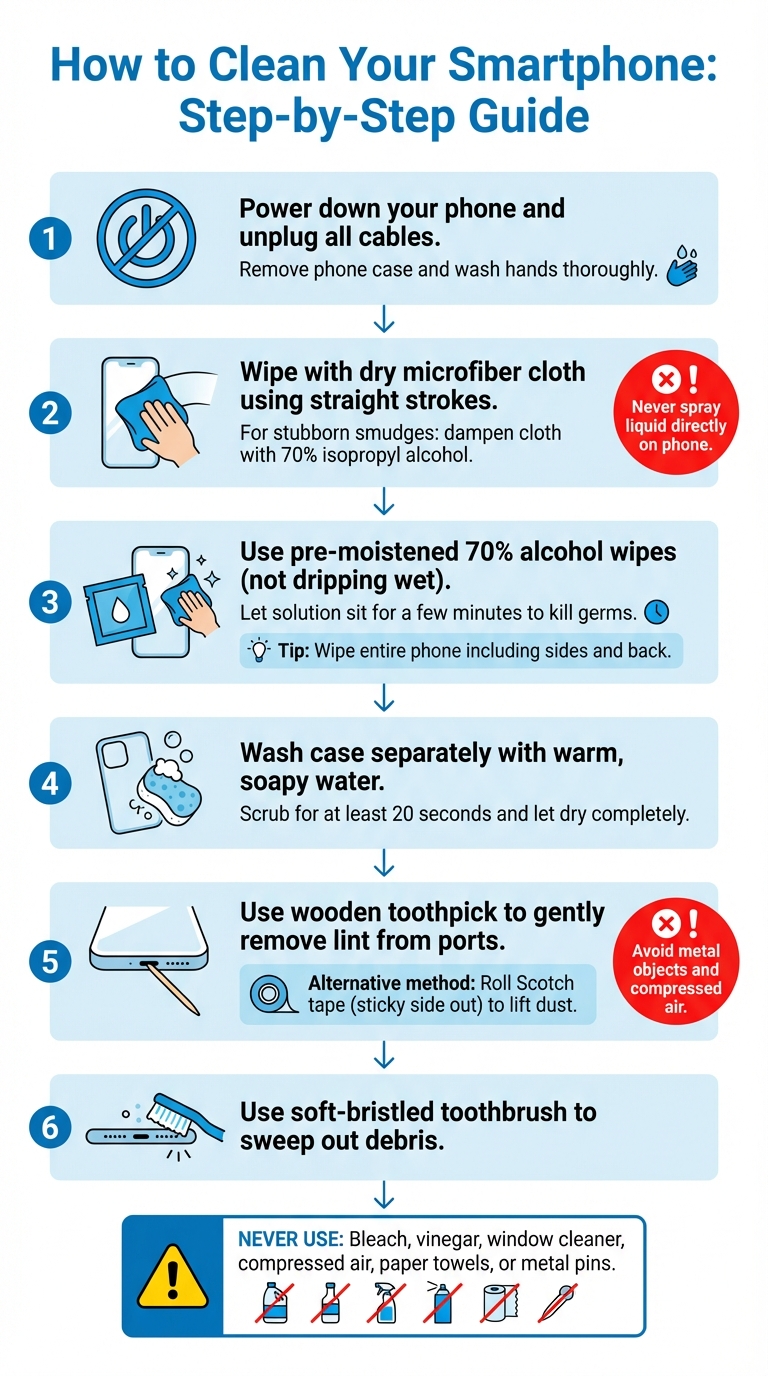
Step-by-Step Guide to Cleaning Your Smartphone Safely
Preparing Your Phone for Cleaning
Before getting started, make sure to power down your phone and unplug any charging cables. This step helps avoid short circuits or accidental inputs during the cleaning process. Take off your phone case as well – there’s often hidden dirt and grime lurking underneath. To keep things hygienic, wash your hands thoroughly both before and after cleaning your device. Once your phone is powered down and prepped, you’re ready to tackle the screen and body.
Cleaning the Screen and Body
Start by wiping the screen with a dry microfiber cloth, using straight strokes. This simple technique clears away fingerprints and dust without introducing any moisture. If you encounter stubborn smudges, slightly dampen the microfiber cloth with 70% isopropyl alcohol or distilled water – but never spray liquid directly onto the phone.
For disinfecting, pre-moistened alcohol wipes work well, but ensure they aren’t dripping wet. As Burton Kelso, Technology Expert and Owner of Integral, points out:
"When applying cleaning solutions, sometimes you have to let the wet solution sit on your phone for a few minutes to kill germs".
Carefully wipe the entire phone, including the sides and back, while keeping moisture away from sensitive areas like charging ports and speakers. This not only maintains the phone’s functionality but also keeps it looking great. Don’t forget the case – wash it separately with warm, soapy water for at least 20 seconds, and let it dry completely before putting it back on your device. Once the screen, body, and case are clean, it’s time to deal with the smaller, harder-to-reach areas.
Cleaning Ports and Openings
Charging ports can collect lint and debris over time, which may interfere with your phone’s performance. Use a wooden toothpick to gently remove any blockages. Alex Hausfeld, Manager at uBreakiFix, explains:
"If you plug your phone in and can see part of the charger not going all the way into the device, that tells you something is blocking it. Even the slightest bit of lint can stop it".
For speaker grilles, a soft-bristled toothbrush works well to sweep out debris. Another option is the tape trick: roll a small piece of Scotch tape into a cylinder with the sticky side out, then press it gently into the ports to lift out dust. Avoid using metal objects like paperclips or compressed air, as both Apple and Consumer Reports warn that these could damage your phone’s internal components or push debris further inside. By following these steps, you’ll ensure that your smartphone stays clean and functions properly.
sbb-itb-2e56335
Preventative Care and Maintenance
Using Protective Accessories
Using protective accessories can cut down on the need for frequent deep cleaning, helping to maintain your smartphone’s longevity. For example, antimicrobial screen protectors infused with silver ions can kill bacteria that collect on your screen. These protectors are not only affordable but also shield your display from harsh cleaning agents that could damage the factory-applied oleophobic coating.
If you’re looking for advanced disinfection methods, consider UV sanitizers like PhoneSoap. These devices use UV-C light to eliminate 99.99% of germs and bacteria while simultaneously charging your phone. Additionally, having a microfiber sticker attached to your phone makes it easy to wipe away smudges on the go. When choosing a phone case, materials matter – opt for silicone or leather over plastic, as viruses tend to survive for shorter periods on these surfaces.
But it’s not just about the accessories – how you handle your phone daily can make a big difference in keeping it clean.
Developing Clean Phone Habits
Did you know the average person touches their phone 2,617 times a day? For heavy users, that number jumps to 5,427 times. With so much contact, your hands are a major source of contamination. To reduce the spread of germs, wash your hands for at least 20 seconds before using your phone, especially after touching shared surfaces like door handles, grocery carts, or gas pumps.
Certain environments pose higher risks for germs. Avoid using your phone in public restrooms, on public transportation, or while handling raw food in the kitchen. If you’re cooking, try printing recipes or using voice commands to avoid touching the screen. At the gym, keep your phone in a clean pocket or use an armband instead of placing it on shared equipment. When carrying your device, store it in a clean, designated pocket in your bag to keep it away from unsanitary items. And to maintain your personal "germ bubble", limit how often you share your phone with others.
Sometimes, though, your phone may need more than routine cleaning.
Signs Your Phone Needs Professional Cleaning
If regular cleaning doesn’t resolve certain issues, it may be time to call in the professionals. For instance, if your phone’s speakers or microphones remain muffled despite using a soft brush or tape, debris might be lodged too deep to remove on your own. Similarly, persistent "moisture detected" alerts or trouble plugging in a charging cable could signal compacted lint or sand that requires professional tools to safely extract.
Blurry or hazy photos that don’t improve after cleaning the external lens might mean that dust or oils have worked their way into the camera housing. Visible buildup in the seams where the phone’s body meets the glass display – or DIY cleaning attempts that leave particles stuck in crevices – are also signs that professional cleaning is needed.
For these situations, consider reaching out to experts like Gadget Medics (http://gadgetmedics.com) in Boca Raton. Their trained technicians can safely remove debris, restore your phone’s performance, and ensure your warranty remains intact.
Conclusion
Key Takeaways
Your smartphone is a magnet for germs due to frequent handling, and cleaning it regularly helps protect both your health and the device’s functionality. Always turn off and unplug your phone before cleaning to avoid short circuits or accidental inputs. Stick to soft, lint-free microfiber cloths for wiping, and when disinfecting, use 70% isopropyl alcohol or 75% ethyl alcohol wipes. Make sure to dampen the cloth instead of applying liquids directly to your phone.
Avoid using harsh chemicals like bleach, window cleaners, hand sanitizer, dish soap, or vinegar. These substances can damage the screen’s oleophobic coating, which is designed to resist fingerprints. For cleaning ports, gently remove lint and dust with Scotch tape or a soft-bristled toothbrush, and skip compressed air – it can harm sensitive internal components.
Even waterproof phones aren’t immune to issues caused by water in the ports. Considering that 92% of cell phones carry bacteria such as E. coli and Streptococcus, a quick daily wipe-down can significantly reduce the risk of illness. While these practices address most cleaning needs, some problems may require professional attention.
When to Seek Professional Help
If routine cleaning doesn’t resolve issues, it might be time to consult an expert. Persistent debris in ports, speakers, or microphones, or damage to the screen’s protective coating from improper cleaning, are clear signs you need professional service. Similarly, if charging problems persist due to moisture in the ports, expert care is essential.
Gadget Medics (http://gadgetmedics.com) in Boca Raton specializes in electronics repair and deep cleaning. Their skilled technicians can safely handle stubborn grime and restore your phone to peak performance. Plus, they offer competitive pricing and a warranty · Lifetime with Broken Club on repairs, giving you peace of mind.
FAQs
What are the best ways to keep my phone clean and prevent it from getting dirty?
To keep your phone clean and minimize dirt buildup, it’s all about developing smart habits. Start by washing your hands frequently, especially after handling food, touching public surfaces, or using the restroom. Your hands transfer oils and germs to your phone, making cleanliness essential. Also, avoid placing your phone on questionable surfaces like gym equipment or bathroom counters. Instead, opt for a clean tray or a sanitized area whenever possible.
For daily upkeep, a lint-free microfiber cloth is your best friend. Use it to gently wipe away fingerprints and dust. Keeping an extra cloth in your bag or on your nightstand ensures you can clean your phone anytime. If you use a phone case, make sure it’s easy to remove so you can clean it regularly – dirt loves to hide along the edges.
When it’s time for a more thorough cleaning, lightly dampen a microfiber cloth with distilled water or a mix of water and white vinegar. Never spray liquids directly on your phone, and avoid harsh cleaners like bleach or ammonia-based products, as they can ruin your phone’s coating. If your device is waterproof, you can use a mild soap-water solution, but always dry it completely afterward to prevent moisture damage.
For stubborn grime or a professional touch, check out Gadget Medics in Boca Raton. They offer expert cleaning and repair services to keep your phone looking great and germ-free. Plus, their repairs come with a warranty · Lifetime with Broken Club, giving you extra peace of mind.
What should I do if cleaning my phone doesn’t solve the problem?
If cleaning your phone hasn’t fixed issues like an unresponsive screen, flickering display, or audio problems, the issue might go beyond surface dirt and point to a hardware malfunction. Steer clear of using extra liquids or abrasive tools, as these can lead to even more damage.
For a dependable fix, check out Gadget Medics in Boca Raton. Their certified technicians can pinpoint the exact issue – whether it’s a damaged screen, a failing battery, or another internal problem – and handle the necessary repairs. They offer quick turnaround times, fair pricing, and a warranty · Lifetime with Broken Club on most repairs, giving you peace of mind while they get your device back in working order.
Are UV sanitizers a safe and effective way to clean your smartphone?
UV-C sanitizers are a handy tool for cutting down germs on your smartphone. They work by emitting short-wavelength ultraviolet light, which neutralizes bacteria and viruses. The best part? They’re safe for your device when used properly – no water damage, no chemical residue to worry about. In fact, a typical 5-minute cycle in a UV-C sanitizer can wipe out more than 99% of surface microbes.
That said, not all UV-C sanitizers on the market deliver the right amount of UV light to ensure effectiveness. Plus, improper use – like exposing your skin or eyes to the light – can be dangerous. To get the most out of your UV-C sanitizer, always follow the manufacturer’s guidelines. Make sure your phone is fully enclosed in the device, and never look directly at the light.
If you’re still on the fence about UV-C sanitizers or need advice on keeping your phone germ-free, reach out to Gadget Medics. They can guide you toward safe cleaning methods and recommend reliable UV-C sanitizers, all while helping you protect your device.