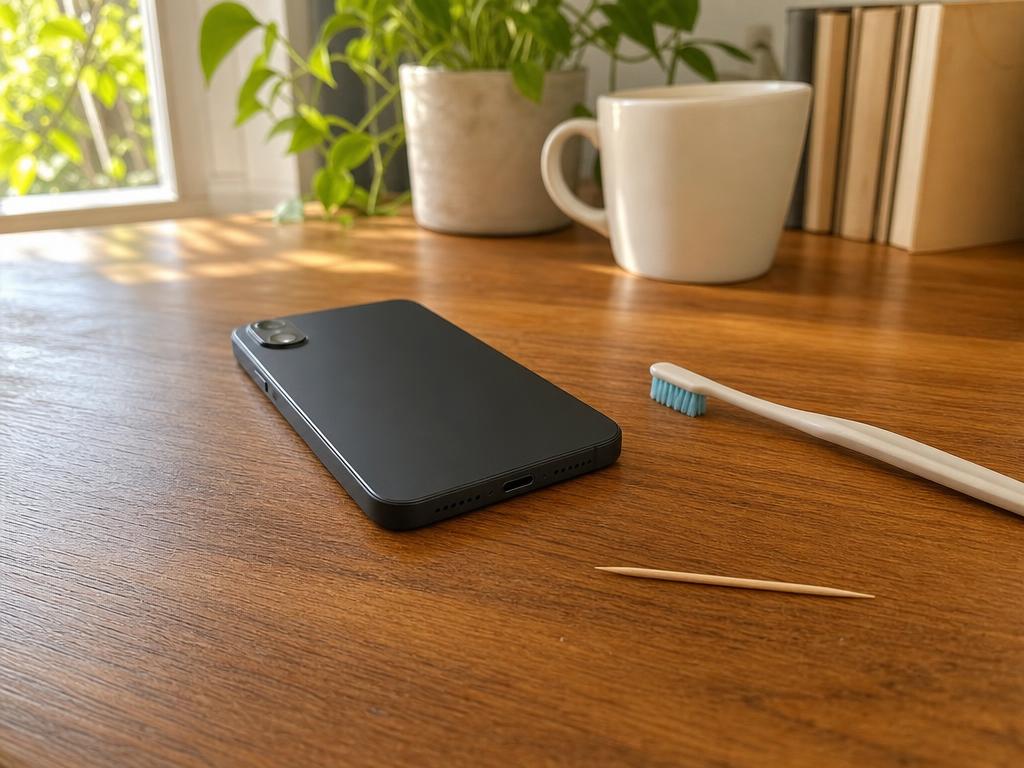
Most “phone won’t charge” calls we get at Gadget Medics come down to one culprit: a compacted plug of lint wedged at the back of the USB-C or Lightning port. In our experience, a careful two-minute cleaning with the right tool fixes roughly 70% of charging problems — you don’t need to book a Genius Bar appointment, ship your device to a service center, or assume the port is broken. Most of the time, it just needs to breathe again.
Get Your Charging Port Checked Today
Same-day phone and laptop port cleaning and repair at both Boca Raton locations. Walk-ins welcome.
In this article:
- What’s actually happening inside a dirty charging port
- Safe tools vs. dangerous ones
- Step-by-step: how to clean USB-C and Lightning ports safely
- Gadget Medics vs. Apple Store vs. Best Buy Geek Squad
- 5 signs your port needs professional repair
- Why South Florida’s climate is harder on charging ports
- Why Boca Raton trusts Gadget Medics
- Frequently asked questions
What’s Actually Happening Inside a Dirty Charging Port
USB-C and Lightning ports are small downward-facing openings that spend most of the day in your pocket, your bag, or a South Florida car cupholder. The motion of walking literally pumps debris in, and it compacts against the electrical contacts at the back of the port over weeks and months.
That debris creates a physical gap between your cable’s contacts and the port’s pins, breaking the electrical circuit before charging can begin. Many people assume their cable is failing or their battery is dying when the real issue is a 2mm plug of pocket lint sitting exactly where the cable connector needs to seat. You don’t need a new phone and you don’t need to drive to the Apple Store — you need five minutes and the right tool.
In our experience at Gadget Medics, roughly 6 in 10 walk-ins who come in saying their phone “stopped charging overnight” have a lint or debris issue, not a hardware failure. The other 4 in 10 have bent contact pins, corroded contacts from South Florida humidity, or a cracked port mount — those need actual repair. Knowing which situation you’re in is the first step.
Palm Beach County’s average humidity runs 74% year-round, spiking to 85–90% on summer afternoons. That moisture accelerates oxidation on the copper contacts inside USB-C and Lightning ports. A phone carried through Boca Raton’s heat in August corrodes its charging contacts faster than the same model used in a dry climate — and that oxidation often looks like a clean port while adding enough resistance to cause slow or intermittent charging.
Safe Tools vs. Dangerous Ones — What to Use and What to Avoid
This is the most important section to read carefully. The wrong tool turns a $0 DIY fix into a genuine repair.
Safe tools — use these
- A dry, soft-bristle toothbrush — the best first tool for any charging port. Gently sweep left-right with your device powered off. Works on both USB-C and Lightning ports without risk of contact damage.
- A wooden or plastic toothpick — for dislodging compacted lint. Insert straight in along the inner edge, never pry sideways. Wood and plastic don’t scratch contact pads or cause shorts.
- Compressed air (from a can, held upright) — short 1–2 second bursts from 2–3 inches away. Always hold the can upright. Port facing up so dislodged lint falls out.
- An interdental brush — the soft type sold for cleaning around braces. Gets around the contact pins better than a standard toothbrush, especially in USB-C ports.
- 99% isopropyl alcohol on a cotton swab — only for visible corrosion (greenish or white residue). Let the port air-dry at least 5 minutes before reconnecting power.
What will damage your port — avoid entirely
- Metal objects of any kind — no bobby pins, no paper clips, no sewing needles. Metal scratches contact pads, bends the center pin in Lightning ports, and can short the port if the device is powered on. We’ve repaired dozens of ports that had working contacts until someone tried a “quick metal pick” cleaning. Metal picks are the single most common cause of avoidable port damage we see in our Boca Raton shops.
- Compressed air held upside-down — releases propellant liquid at around −50°C, which can thermally shock solder joints in the port assembly and cause cold-fracture cracks. Always hold the can upright. No exceptions.
- Water, rubbing alcohol (70%), or cleaning sprays — standard rubbing alcohol contains too much water. Only 99% isopropyl alcohol is safe, and only when fully dried before use.
- Blowing into the port with your mouth — breath moisture accelerates the same corrosion you’re trying to fix. South Florida humidity makes this worse.
Step-by-Step: How to Clean a USB-C or Lightning Port Safely
Follow these steps in order. Patience over force — you’re displacing lint, not scrubbing.
Step 1 — Power off completely
Never clean an active port. iPhone: Settings → General → Shut Down. Android and Samsung Galaxy devices: hold the power button → Power off. MacBooks and Windows laptops: full shutdown. Unplug all cables.
Step 2 — Soft-bristle toothbrush first
Hold the device with the port facing down. Brush left-right 8–10 times. Flip it and tap lightly — you’ll often see lint fall out. Plug your cable in here before doing anything else. This step alone fixes the issue more often than you’d expect.
Step 3 — Wooden toothpick for compacted lint
Insert the toothpick straight along the inner wall. Don’t angle toward the center. Press compacted lint gently toward one side wall and sweep it toward the port opening. For Lightning ports: the center pin is fragile — work the edges, never the center. For USB-C: no center pin, slightly more room along the edges.
Step 4 — Compressed air if available
Hold the can upright — always upright. Port facing up. One 1–2 second burst from 2–3 inches away. Wait a few seconds. Repeat 2–3 times.
Step 5 — Test with two different cables
Your cable and a known-good cable from a different source. If both seat firmly and charging begins, you’re done. If neither works after cleaning, stop DIY and come see us.
Step 6 — Visible corrosion: 99% isopropyl alcohol
If you see a greenish or white residue, dampen a fresh cotton swab with 99% isopropyl alcohol. Wipe the visible contacts gently. Air-dry 5 minutes before reconnecting power. In South Florida summers, corrosion from heat and humidity is more common than most guides mention.
When these steps don’t resolve the problem — cable won’t seat, charging is intermittent, or the port feels loose — stop. Further DIY risks bending a contact that was previously functional. That’s the right moment to bring in your phone for same-day repair.
Gadget Medics vs. Apple Store vs. Best Buy Geek Squad — What Each Option Costs You
If cleaning didn’t fix the problem, you have realistic options in South Florida.
Apple Store — Town Center at Boca Raton
Apple’s Genius Bar handles iPhones, iPads, and MacBooks under warranty or AppleCare+. Out of warranty, Apple typically swaps entire subassemblies rather than repairing individual port components — you pay a flat module-replacement fee. Genius Bar appointments at the Apple Store run 3–7 days out during season, so same-day is rarely available. Apple doesn’t repair Samsung Galaxy phones, Android devices, or Windows laptops.
Best Buy Geek Squad — multiple South Florida locations
Geek Squad handles cleaning and basic assessment at Best Buy, but complex port repairs — bent pins, corroded contacts, cracked USB-C mounts — typically ship to a Best Buy service center. That adds 7–14 business days. Same-day port repair through Geek Squad at a South Florida Best Buy is unusual. The big-box service model prioritizes volume over individual hardware attention.
Gadget Medics — Mission Bay Plaza and Feinrose Plaza, Boca Raton
We handle USB-C and Lightning port cleaning, bent-pin repairs, and port replacements on iPhones, Samsung Galaxy phones, MacBooks, Windows laptops, and tablets — same-day, walk-in, no appointment needed. We look at your device in front of you and tell you what’s happening before any work begins. No Genius Bar queue, no big-box service center wait, no mail-in. Our phone repair service in Boca Raton covers the full range of charging and port issues, and for laptops, our laptop repair team in Boca Raton handles USB-C port replacements and charging board repairs the same day in most cases. Since 2018, over 600 Google reviewers across both locations have rated us 4.8+ stars on average.
5 Signs Your Port Needs Professional Repair — Not Just Cleaning
1. Cable won’t fully click in or feels loose after cleaning
Spring contacts that are bent or broken don’t get fixed by removing lint. A port that feels loose or wobbly even when the charging cable is inserted usually has a bent contact or cracked port mount. Same-day repair is simpler than waiting until the contact breaks entirely.
2. Charging only works in one specific cable angle
You’ve found the magic position — cable slightly tilted, propped against something. That angle works because a bent contact makes partial contact at one spot. Continuing to charge this way stresses the remaining functional portion of that contact. You don’t need to keep hunting for the right angle; you need a same-day repair.
3. iPhone shows “Liquid Detected” repeatedly on a dry device
Apple’s moisture sensors live inside the Lightning and USB-C port assembly. Corrosion or a damaged sensor strip triggers false liquid warnings on a completely dry phone. This is fixable, but not with a toothbrush. In South Florida, we see this regularly on phones that’ve spent summers near pools or Boca Raton beaches.
4. Port visibly wobbles when you move the cable
The port is physically separating from the board — its solder joints have fractured from repeated cable stress, common on thin laptops whose USB-C ports take daily sideways cable pulls. Same-day soldering repair or port replacement is the right fix.
5. Visible deformation, discoloration, or crumbling debris inside
Shine a flashlight in. If you see bent metal, black scoring from a brief arc, or corroded debris — stop. Structural damage requires a careful approach to avoid making the port irreparable. Bring it in and we’ll take a look and tell you exactly what’s needed before any decision.
Why South Florida’s Climate Is Harder on Charging Ports
Most charging port guides skip this, but South Florida’s environment genuinely accelerates port problems compared to the national average.
Humidity: Boca Raton averages 74% relative humidity year-round, hitting 85–90% in summer. That moisture oxidizes the copper contacts inside USB-C and Lightning ports. After 12–18 months of daily pocket carry in Palm Beach County heat, charging contacts develop an oxide layer that increases resistance — causing slow or intermittent charging even on a visually clean port. This “clean port, still won’t charge” scenario is one of the most common same-day issues we handle.
Salt air and beach proximity: Salt air from Deerfield Beach, Delray Beach, and Boca Raton’s own coastal areas corrodes electrical contacts in ways that don’t show up for months. In our experience, phones used regularly near the beach need port cleaning 30–40% more often than phones kept inland.
Heat cycles: South Florida summers mean phones go from 70°F air-conditioned interiors to 100°F+ car interiors multiple times daily. Those thermal cycles expand and contract the solder joints anchoring the port to the board — a real contributor to port mount failures on thin MacBooks and slim Android phones over time.
The same-day solution for any of these: bring the device in and we’ll tell you whether it’s a cleaning job or a repair. A few practical tips to slow things down: a USB-C or Lightning port dust cover ($3–5 in multipacks) stops lint accumulation. A small desiccant packet in your car’s center console reduces in-car humidity. Same-day habits matter too — shaking your phone slightly before inserting a cable dislodges loose lint before it compacts.
Why Boca Raton Trusts Gadget Medics for Charging Port Repair
Gadget Medics — Boca Raton’s independent electronics repair shop since 2018. We repair USB-C and Lightning charging ports on iPhones, Samsung Galaxy phones, MacBooks, Windows laptops, iPads, and tablets at both our Boca Raton locations. Walk-ins welcome — no appointment needed, no mail-in, no Genius Bar wait. All repairs backed by our 90-day warranty on parts and labor, with lifetime coverage for Broken Club members. Over 600 Google reviewers across Mission Bay Plaza and Feinrose Plaza rate us 4.8+ stars on average.
Call (561) 279-6888 or stop by Gadget Medics — we’ll take a look at your port and give you an honest read on what’s happening, same day.
We’re an independent shop, not a franchise or a big-box chain. The technician who assesses your port is the same person who fixes it — no mail-out queue, no 10-day service-center wait. In our 8 years repairing electronics in Boca Raton, we’ve cleaned and repaired more USB-C and Lightning ports than we can count, for neighbors from Delray Beach, Deerfield Beach, Coral Springs, and Parkland who want a same-day answer and an honest price before any work starts.
Frequently Asked Questions
Can I clean my iPhone Lightning port with a toothpick?
Yes — a wooden or plastic toothpick is one of the safest DIY tools for a Lightning port. Insert it straight along the inner edge and gently sweep compacted lint toward the port opening. Never use metal — the center pin in a Lightning port is fragile and a metal pick can bend it with minimal force, turning a simple cleaning into a $80–100 repair. Same rule applies to USB-C ports, just work along the edge walls rather than the center.
How long does a charging port repair take at Gadget Medics?
Most USB-C and Lightning port repairs at our Boca Raton locations take 45–90 minutes for same-day service. For iPhones, Samsung Galaxy phones, and MacBooks we typically have parts on hand. Walk-ins welcome at both Mission Bay Plaza and Feinrose Plaza — no appointment needed. We’ll check your port first and give you a time estimate before any work begins.
Is compressed air safe to use in a charging port?
Yes, with one rule: hold the can upright. An upside-down compressed air can releases propellant liquid at around −50°C, which can crack solder joints in the port assembly. Hold the can upright, use short 1–2 second bursts, port facing up so debris falls out. Never use a regular air compressor — the pressure is too high and can damage flex cables inside the device.
My port looks clean but my phone still won’t charge — what’s wrong?
Three common causes: a bent contact pin (invisible to the naked eye, detected by a cable that feels slightly loose), contacts oxidized from South Florida humidity (frequent even when visually clean), or a failing charging IC on the board. Come in — most port checks take under 10 minutes and we’ll tell you what’s actually happening before any work starts.
Does Gadget Medics repair USB-C ports on laptops, not just phones?
Yes — we handle USB-C port replacements and charging board repairs on MacBooks, Windows laptops, and USB-C tablets. Laptop USB-C ports often fail at the solder joint rather than the port housing, especially on thin laptops that take sideways cable stress daily. Same-day service is available for most laptop charging port repairs at both our Boca Raton locations.
What if my DIY cleaning made the port worse?
Stop using the port immediately. If you bent a contact or pushed debris deeper with a metal tool, continued charging risks further damage or a short. Bring it in — we see this regularly and can usually recover the situation. The key is stopping before inserting more cables. What becomes difficult is a contact shorted by a metal pick while the device was powered on — which is why the rule is: power off before any cleaning attempt.