Your smartphone battery’s lifespan depends heavily on how you charge it. Common habits like charging to 100%, letting it drain to 0%, or exposing your phone to heat can speed up battery wear. By making small adjustments, you can extend your battery’s life and avoid costly replacements.
- Ideal Charging Range: Keep your battery between 20% and 80% to reduce stress and voltage strain.
- Avoid Heat: High temperatures (above 104°F) can cause permanent damage. Charge in cool, ventilated areas and avoid using your phone during charging.
- Fast Charging: Use sparingly, as it generates heat. Opt for slower charging methods for daily use.
- Overnight Charging: Use features like "Optimized Battery Charging" to avoid prolonged full charges.
- Avoid Full Drains: Draining to 0% regularly shortens battery life. Frequent, shallow charges are better.
Following these tips helps combat battery aging, ensuring your phone lasts longer. If your battery shows signs of swelling, rapid draining, or overheating, it’s time to seek professional replacement services.
How Smartphone Batteries Work
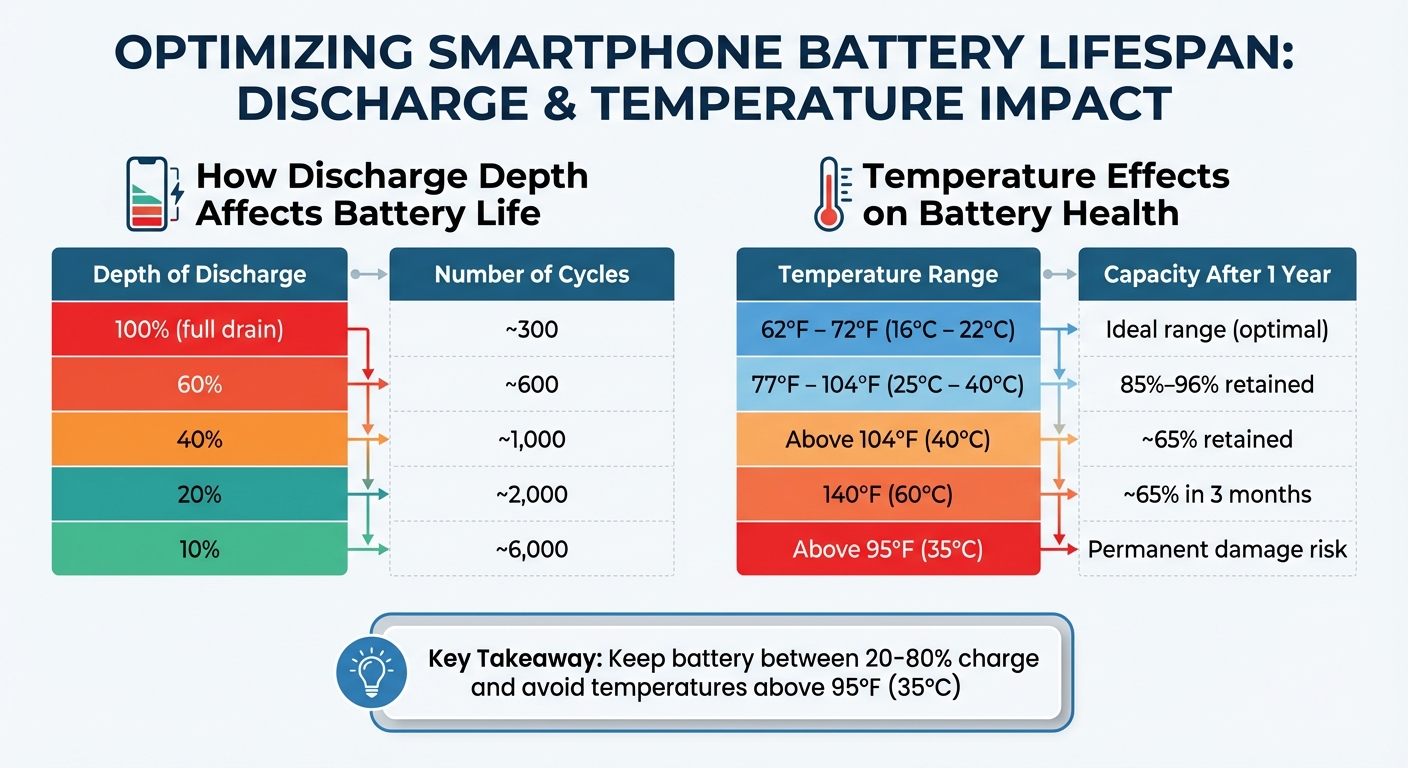
Smartphone Battery Health: Temperature and Discharge Impact Chart
To better care for your smartphone’s battery, it’s helpful to understand how it works. Most modern smartphones use lithium-ion batteries, prized for their ability to store a lot of energy in a small space. Here’s how they function: lithium ions move between two electrodes – a cathode (positive, often made of lithium cobalt oxide) and an anode (negative, typically graphite). When you charge your phone, ions travel from the cathode to the anode through an electrolyte solution, storing energy. When you use your phone, the ions flow back, releasing energy to power your device.
This process isn’t without wear and tear. Over time, the movement of ions creates tiny cracks in the cathode and builds up insulating layers, which gradually reduce the battery’s efficiency. This is why your phone’s battery life tends to decline after a couple of years.
Battery Aging and Charge Cycles
A battery’s lifespan is closely tied to its charge cycles. But what exactly is a charge cycle? It’s when you’ve used 100% of the battery’s capacity, whether all at once or spread out over time. For instance, using 50% of your battery today, recharging it, and then using another 50% tomorrow equals one full cycle. Most lithium-ion batteries are designed to last for 300 to 500 cycles, though newer smartphones often handle 800 cycles or more.
How you charge your phone also matters. Deep discharges – draining your battery completely – can strain it more than keeping the charge between 20% and 80%. The table below highlights how the depth of discharge affects the number of cycles your battery can handle:
| Depth of Discharge | Number of Cycles |
|---|---|
| 100% (full drain) | ~300 |
| 60% | ~600 |
| 40% | ~1,000 |
| 20% | ~2,000 |
| 10% | ~6,000 |
Source:
Voltage also plays a big role in battery health. Reducing the peak charge voltage by just 0.10V can potentially double the number of cycles your battery can endure. For example, charging your phone to 80% instead of 100% helps lower voltage stress, which can extend the battery’s life.
"A lithium-ion battery doesn’t like to be fully charged. And it doesn’t like to be fully charged and warm." – Isidor Buchmann, CEO, Cadex Electronics
Heat is another enemy of battery longevity. For example, if a battery is kept fully charged at 140°F (60°C), it can lose up to 40% of its capacity in just three months. Even less extreme heat, like 104°F (40°C) – think of a phone left in a hot car – can cause a 35% capacity loss over a year if the battery remains fully charged.
These insights can also help clear up some common misunderstandings about battery care.
Common Battery Myths Explained
Knowing how batteries work is the first step to debunking persistent myths. One widespread misconception is that you need to fully drain your battery before recharging it. This idea stems from older nickel-cadmium batteries, which suffered from the "memory effect." However, lithium-ion batteries don’t have this problem. In fact, draining them completely can damage the cathode and shorten the battery’s lifespan.
Another myth is that you should regularly perform a full 0–100% charge cycle to "calibrate" the battery. While a full cycle might occasionally help recalibrate your phone’s battery percentage if it’s acting up, doing this often isn’t good for the battery. Instead, frequent, shallow charges – like topping up from 40% to 70% – are much better for maintaining the health of lithium-ion batteries. By understanding and avoiding these myths, you can adopt smarter charging habits that help your battery last longer.
Daily Charging Tips to Extend Battery Life
Now that you know how batteries age, let’s dive into some practical tips to keep your battery in better shape over time. These simple daily habits can make a big difference.
Keep Battery Between 20% and 80%
A great way to extend battery life is by keeping the charge level between 20% and 80%. Staying within this range reduces stress on the battery and slows down capacity loss. When your battery isn’t fully charged, it operates at a lower voltage, which is much gentler on its lifespan. Instead of letting your phone drain completely or charging it all the way to 100%, aim to plug it in when it’s around 20–30% and unplug once it hits 80%. This balanced routine helps avoid overcharging and over-discharging, both of which can shorten battery life.
Avoid Complete Drains and Constant Full Charges
Letting your phone drain to 0% regularly isn’t ideal. Batteries are designed for a limited number of full charge cycles – around 500 – before their capacity drops to about 80%. On the flip side, keeping your battery at 100% for long periods also isn’t great. High voltage stress from a constant full charge speeds up wear and tear. For example, if your phone stays fully charged in temperatures above 104°F (40°C), its capacity could shrink to just 65% within a year.
Overnight Charging: Problems and Fixes
Charging overnight is a common habit, but it has its downsides. Even though modern devices stop pulling power once they hit 100%, the battery still stays at a high voltage, which can accelerate aging. Plus, charging in a case or an enclosed area can trap heat, further harming the battery.
To minimize these risks, enable features like "Optimized Battery Charging" on your device (e.g., iOS settings). These tools learn your daily routine and keep the charge around 80% overnight, finishing the last 20% just before you wake up. For added protection, remove your phone case if it heats up during charging and use a 5- to 10-watt charger instead of fast charging. Reserve fast charging for quick daytime boosts when you’re in a hurry.
Heat Management and Fast Charging
High temperatures can cause your phone’s battery to deteriorate faster by breaking down the electrolytes inside, which permanently reduces its capacity. Ideally, your phone should operate between 62°F and 72°F (16°C to 22°C) for the best performance and longevity. If the battery is kept between 77°F and 104°F (25°C to 40°C), it can retain around 85% to 96% of its capacity after a year. But consistently charging your phone to 100% at temperatures above 104°F (40°C) may drop that capacity to roughly 65% within a year. Worse still, at 140°F (60°C), this level of degradation can occur in just three months. When temperatures exceed 95°F (35°C), permanent damage to the battery can happen. Keeping your device cool is key to slowing this wear and tear. Here are some simple ways to manage heat effectively.
How Heat Damages Your Battery
Excess heat speeds up chemical reactions in your phone’s battery, breaking down the liquid electrolytes that are essential for its performance. To help prevent this:
- Take off your case while charging: Cases can trap heat, so removing them during charging can help your phone stay cooler.
- Charge in a cool, ventilated space: Avoid placing your phone on soft surfaces like beds or under pillows, as these can block airflow.
- Avoid direct sunlight: Keep your phone out of places like car dashboards or other sun-exposed spots, especially while charging.
- Unplug if it gets too hot: If your phone feels uncomfortably hot, unplug it right away and let it cool down before using or charging again.
Fast Charging Considerations
Fast charging is convenient but can generate more heat due to the higher voltage and current it delivers. This extra heat, especially during full charge cycles, can speed up battery aging. To minimize the impact:
- Limit fast charging usage: Save it for situations when you need a quick charge rather than using it all the time.
- Don’t run heavy apps while charging: Activities like gaming or streaming during fast charging can add unnecessary heat to your device.
| Temperature Range | Impact on Battery Capacity |
|---|---|
| 62°F – 72°F (16°C – 22°C) | Ideal range for maximizing battery longevity |
| Above 95°F (35°C) | Risk of permanent capacity loss |
| 77°F – 104°F (25°C – 40°C) | Retains ~85%–96% capacity after 1 year |
| Above 104°F (40°C) | Drops to ~65% capacity after 1 year |
| 140°F (60°C) | ~65% capacity reached in just 3 months |
sbb-itb-2e56335
When to Get Professional Battery Service
Even with the best charging habits, smartphone batteries eventually wear out and may require professional attention. Most smartphone batteries begin to degrade after 300–500 full charge cycles, and you’ll likely notice performance issues once the battery capacity dips below 80%. This often happens around the two-year mark, leading to problems that can’t be resolved simply by tweaking your charging routine.
Warning Signs of Battery Problems
One of the most alarming signs of a failing battery is physical swelling. If you notice your phone’s screen lifting or the casing looking warped, stop using the device immediately. Swelling indicates gas buildup inside the battery, which can result in leaks or even explosions [19, 20].
"Android batteries aren’t as ‘pop-in, pop-out’ as they look. We’ve seen at-home replacements turn into swollen batteries and lifted screens more times than we can count".
Other red flags to watch for include:
- Unexpected shutdowns when the battery percentage still shows a charge, signaling the battery can no longer provide consistent voltage [19, 20].
- Rapid power drain or erratic percentage readings, like staying at 100% for too long before suddenly dropping [2, 20].
- Persistent overheating during light use or while idle, which could indicate internal damage [19, 20].
- Charging failures, even when using a known working cable and port, suggesting issues with the battery or internal charging circuitry.
Battery Replacement Services
When your phone’s battery issues go beyond what routine care can fix, it’s time to seek professional help. Replacing a worn-out battery can restore your phone’s performance, eliminate shutdowns, and resolve sluggish behavior. Professional diagnostics are especially helpful in determining whether the problem lies with the battery or another internal component, potentially saving you from unnecessary expenses. For example, replacing a chemically aged battery often resolves "throttling" issues, where the operating system slows down the processor to prevent crashes [21, 1].
Avoid attempting to replace swollen batteries yourself. Modern smartphones are designed with batteries that are glued in and challenging to access. Mishandling these batteries can lead to punctures, fires, or damage to other components. For safe and reliable service, Gadget Medics in Boca Raton offers professional battery diagnostics and replacement. They provide a warranty · Lifetime with Broken Club on repairs, and their technicians are trained to handle high-risk situations, ensuring your device is restored to peak performance with the right tools and parts.
Conclusion
To keep your battery running strong for as long as possible, aim to charge it between 20% and 80%, steer clear of extreme temperatures, and opt for slow charging whenever you can. These simple habits help combat the natural aging process of lithium-ion batteries, ensuring your device performs well for years instead of just a few months.
One thing to remember: heat is your battery’s worst enemy. Charging your phone in a cool, well-ventilated area and avoiding demanding tasks like gaming while plugged in can go a long way in preserving its capacity. Stick to certified chargers to ensure safety and reliability . By following these steps, you can delay the typical two-year decline in battery performance. However, if your battery’s performance still takes a hit, it might be time to seek professional help.
When issues like unexpected shutdowns, rapid battery drain, or swelling arise, leave the repairs to the professionals. Modern smartphones require specialized tools for safe battery replacements. For those in Boca Raton, Gadget Medics offers expert diagnostics and battery replacement services, using genuine parts and even providing a warranty · Lifetime with Broken Club on repairs.
Adopting these charging habits now will help you see a noticeable difference in your battery’s longevity. And when the time comes for professional service, you’ll know exactly where to turn for trustworthy, expert assistance.
FAQs
Why should I keep my smartphone battery charge between 20% and 80%?
Keeping your smartphone’s battery level between 20% and 80% can help minimize wear and tear on the lithium-ion cells. Staying within this range prevents the high voltage and chemical strain that speed up battery degradation over time.
Following this simple practice can go a long way in extending your battery’s life and keeping your device dependable for a longer period.
How does heat impact the lifespan of a smartphone battery?
Excessive heat is a major culprit when it comes to shortening your smartphone battery’s lifespan. High temperatures speed up the chemical aging process of lithium-ion batteries, which gradually reduces their capacity. Over time, this can result in slower performance, unexpected shutdowns, or even permanent battery damage.
To safeguard your phone, steer clear of direct sunlight, avoid leaving it in hot places (like a parked car), and try not to use it heavily while charging. Keeping your device cool is key to preserving its battery health and ensuring it lasts longer.
How can I tell if my smartphone battery needs to be replaced?
If your phone powers off unexpectedly despite showing a full charge, drains power unusually fast, or seems sluggish and unresponsive, it’s likely time to consider replacing the battery. Other telltale signs include apps running slower than usual or your device having trouble handling simple tasks. Tackling these problems sooner rather than later can help prevent more serious damage to your phone.